Co-creating your physical event with your online community
Revisiting some of the basic techniques for building online communities I've developed over the years in the light of the Atmosphere's potential.
(Notes: This is an early draft. As explained in this newsletter edition, I am publishing these early versions as I develop my thoughts in the hope that constructive comments will help me finish the post. More version control in the footer.)
I built the very first online community of practice for the European Commission in 2002 (and blogged about it in 2009). I discovered, almost by accident, that online event co-creation helps you leverage your event to boost your online community, and use your online community to run a more successful event.
These and other online communities were to be my bread and butter for the following ~10 years, and then started dying off as the conversation moved to Twitter and Facebook. The problem was that Twitter and Facebook didn't share, and took the oxygen out of these web-based online communities.
Twitter and Facebook didn't share... But the situation is now changing
But the situation is now changing, as I argued last November in Berlin: the ATProtocol means "social media can support, not undermine, online communities), because we can integrate our website-based online communities with global social media networks.
Where my Berlin presentation focused on magnifying online communities with custom feeds, however, I now want to explore what technologies like standard.site can contribute. Hence the first, exploratory experiment I'm running for atproto.science 2026 - a side event to AtmosphereConf - at the end of March. So if you're coming to Vancouver, let me know and we'll compare notes.
Event co-creation in brief
Event co-creation means involving your community in the definition of the event's content. Members' involvement can take several forms:
- submitting formal proposals for workshops, individual speeches, networking sessions, etc (call them "event items").
- commenting on “provisional” event items (published for discussion by the community, but not yet in the final programme - see below) to help Organisers identify which generate the most interest
- online discussions amongst organisers, proposers and attendees to combine good proposals to create better event items.
This does much more than help Organisers identify the most interesting Submissions - it is where Members discover other Members with similar interests, and encourages them to network online before they meet face to face.
By the time people actually do meet, therefore, they will have been discussing the event content for the preceding months, and so will know exactly Who they want to meet and What they're going to talk about (as well as When and Where, thanks to the messaging & coffee table booking systems we also built into the site).
Benefits for attendees
What we discovered back in 2002 was that most conference attendees were very keen on this approach. Why is not hard to understand - as an attendee:
- getting a place in the conference programme:
- means you're helping set the agenda of the event
- increases your visibility.
- the online discussions before the event
- also raises your visibility and develops your network
- help you discover the people you should meet in the limited time you have available on the day, and make them want to meet you.
Benefits for Organisers
The most obvious benefits for the organisers are that this approach:
- ensures the event actually reflects the interests of the attendees,
- is more valuable to each Member in terms of networking.
But it also turns each member into an ambassador: being selected for the provisional programme, after all, is a very good reason to promote the event to all of your friends, so they can support it.
Finally, it injects massive energy into your online community, which can support your organisation's work throughout the year. It's therefore really useful to see event co-creation as an integral part of your community strategy - using event co-creation for your annual event, for example, means the community you assemble for this year's event can come back to take part in the discussion about next year's event, and so on.
How: Key milestones
The trick is to get started early.
A good process for an event held at T=0 looks something like this:
- T-6 months: launch your event website with the simple "save the date," follow us on social, and subscribe to the newsletter messages, so that you can then follow up with your followers and subscribers for...
- T-5 months: launch your open call - in a traditional event co-creation process, users describe themselves as they join your community so that they can propose ideas for the event programme (workshops, speeches, papers, presentations, networking sessions, etc. - it's up to you)
- If you already have a community then your existing members should be able to simply compose and submit the proposal.
- while those who have not yet joined your community now have a very good reason to do so.
- In both cases it helps enormously if your members are submitting ideas directly into your website content management system, not some separate system (online polling tools, Google Sheets, etc.)
- T - 4 months. Close the call, and read the proposals:
- Mark the bad ones as rejected and inform their authors.
- Mark the others as provisional. Importantly, there should be more provisional ideas than you actually have room and time for.
- T-minus 3.5 months: publish the Provisional Programme, thus opening the event co-creation discussion phase
- invite your community members to comment and rate the ideas
- Encourage people with similar ideas to combine forces.
- T-2 months: close the event co-creation discussion phase by publishing the final programme - basically this means
- Rejecting some more ideas, and informing the authors
- Changing the status of the others from provisional to final.
- T-2 - event: continue to encourage the conversation around the final programme.
Of course you don't need to follow those dates exactly, but it is important that people know what the final programme is one or two months before the event so they can make logistics arrangements. For those first co-created events 25 years ago, in fact, we launched the event website 8-9 months before the event because we had several phases of discussion:
- a first call at T-6 asked people to submit ideas for workshops or individual presentations for the Conference Programme (which was a mix of science and policy)
- when we finalised the Conference programme we opened a second co-creation phase in T-3, for the Networking Programme, which focused on networking scientists together across Europe and took place in and around the exhibition. The people who didn't "make the cut" for the conference were encouraged to present networking event proposals, which most of them found them more valuable for their purposes.
The last time I was involved we had over 8,000 comments on the provisional networking programme in the month of August, 2026.
Why look to the Atmosphere?
I've built websites with event co-creation several times since 2002. Each time, all of the interactivity was built into the website's content management system, which was as a result pretty complex.
Today I'm exploring if and how the website could integrate atproto to both simplify the CMS and integrate event co-creation into the global social media conversation, ensuring better engagement.
Identity crisis?
But wouldn't this also restrict that conversation to people who have an ATProto digital identity (DID; in most cases their Bluesky account)?
The short answer is yes... unless you simply gave new users a DID and a Personal Data Server (PDS, if they don't already have one) as part of their account creation process. From their perspective, they're creating an account on your website so that they can get involved in your event. But you're actually giving them:
- a digital identity they can use on your website and every other ATProto app on the Atmosphere, from BlueSky through to Stream.Place
- and a PDS to store their content, which they can move elsewhere whenever they want.
This is therefore best for organisations who have decided to integrate ATproto into both their website and social media presence. They should never have been separated.
Benefits
The first, obvious benefit is personal sovereignty - your users store their content on their PDS (either the one they already had, or the one you're providing them), which means they maintain ownership over it. You don't own them, so treat them well.
The other main benefit, of course, is engagement reach: your event content can become an integral part of the Atmosphere, a social network of over 40 million people. We'll explore how this looks below.
How?
Meet the standard
Firstly, note that you probably won't need to publish every single page of your website onto the Atmosphere - you simply decide which content types are stored on your users' PDSs and published onto your website with a little extra code, called a lexicon.
And the required lexicons already exists: standard.site. As a developer who discovered it less than 2 weeks before writing this put it:
"Within a week, my site had actually turned ATProto into a CMS. I could make posts, update them, or delete them, and all the while these updates are broadcasted to a network that anyone could index" - Standard.site: the Publishing Gateway (Steve Dylan)
Steve shows how flexible and extensible the basic standard.site architecture is by adding a new lexicon for comments. Other developers have done something similar (eg First thoughts on integrating with standard.site).
Getting my head around leaflet
Meanwhile, on leaflet.pub - one of the three originators of standard.site - users can both comment on posts and share image-quotes to their followers on Bluesky.
To be honest it took me a little while to get my head around Leaflet, and there's still a chance that I've got something wrong.
Basic leaflet components
But as far as I can work out, you can do everything from simply publishing a page as a standalone, right through to creating a Publications within which there are Pages, within which you can embed subpages, which appear to the right of the page:
!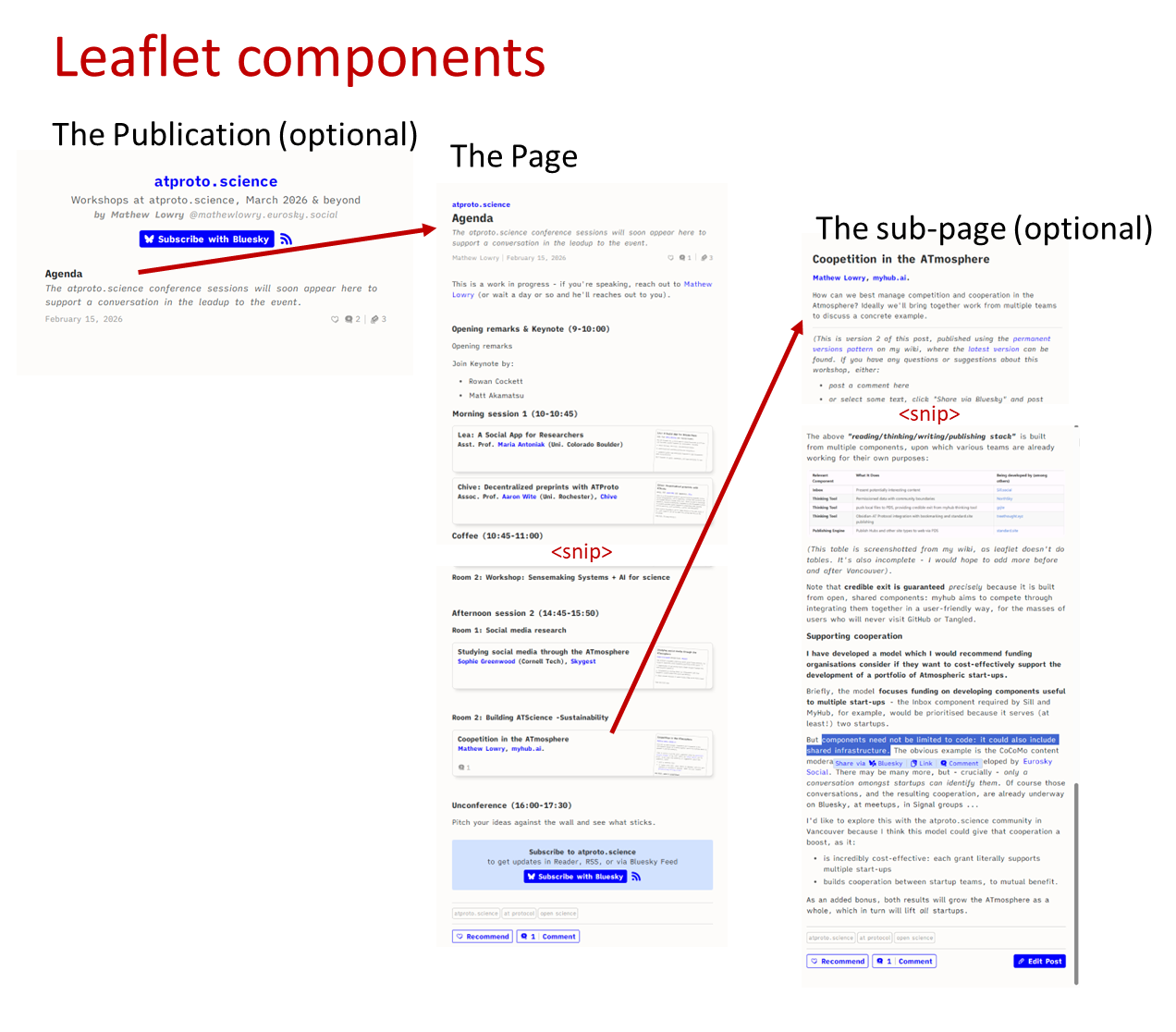
The above badly drawn diagram shows (top-left to bottom-right):
- a publication ("ATProto.science") listing one Page: the agenda
- The Agenda Page (with a large chunk cut for length reasons) largely composed of embedded Subpages
- One of those subpages, open to the right
Interaction and sharing options
Things get really interesting when you want to interact with this content:
!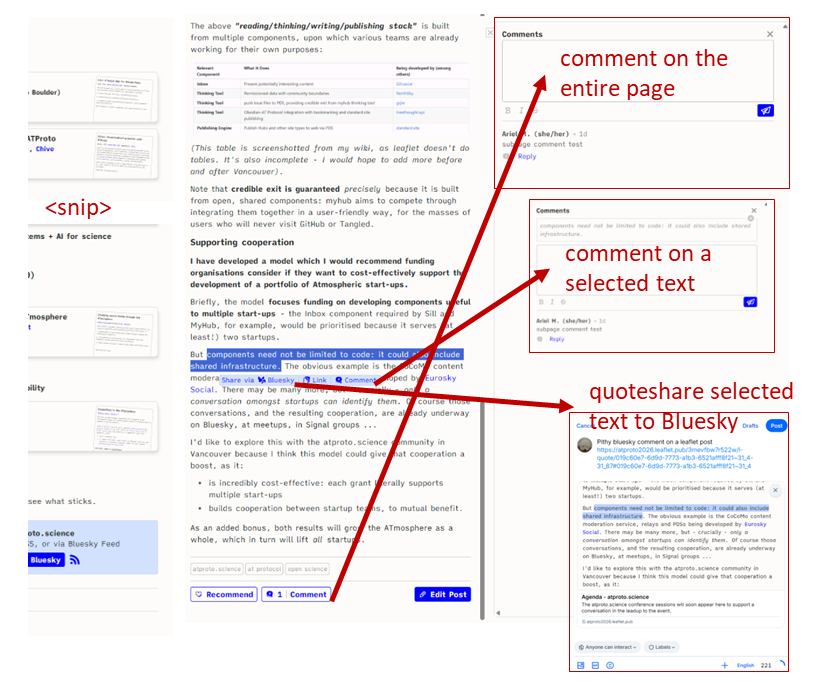
This second badly drawn diagram shows:
- A traditional comment button at the bottom which opens a standard comment field to the right (top right)
- a small pop-up when the user selects some text, giving additional options:
- comment on the selection (the selected text appears above the user's comment)
- share the link to the exact location selected (try it)
- post to Bluesky your thoughts about the selected text - Leaflet creates an image of the selected text, and its immediate neighbourhood
And once I quote-posted my pithy comment to Bluesky, above, the page got a Mentions feed showing all mentions on Bluesky of any (sub)page:
!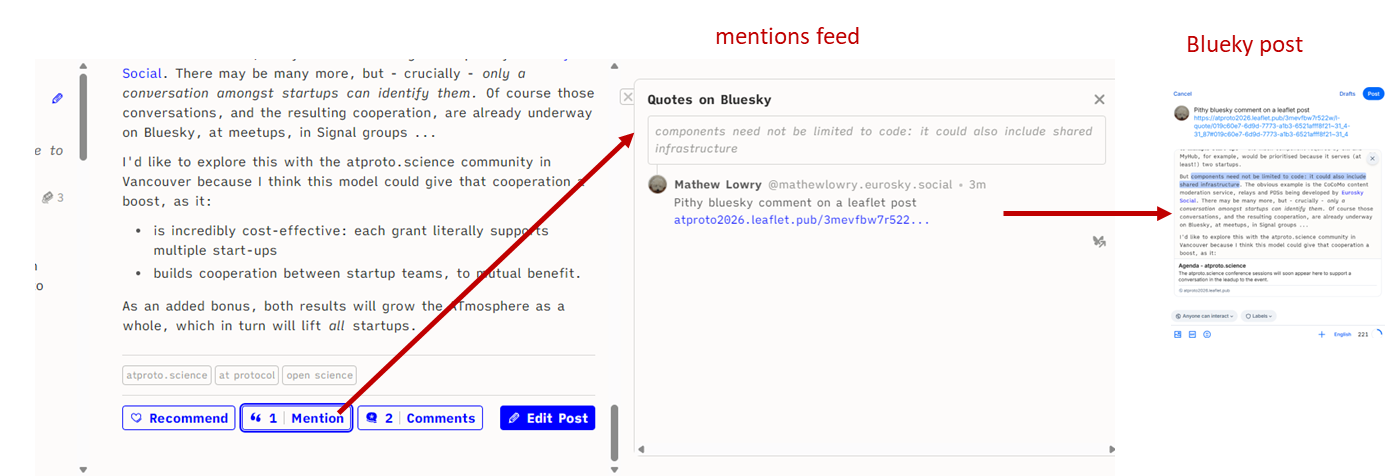
Anyone visiting the page can thus quickly jump to the Bluesky conversations.
Subscribing and discussing
Finally, anyone with a DID can subscribe to any Leaflet publication, and any app can see that subscription. This enables all standard.site apps to do all sorts of interesting things, for example:
- the dedicated Leaflet reader not only shows you posts from Leaflet publications you subscribe to but also from anything you subscribe to on pckt.blog, another standard.site app
- the Leaflet Reader Bluesky custom feed meansyou can keep up with your standard.site subscriptions via any Bluesky app (Bluesky, Blacksky, Anisota, Deck.Blue...)
- there's even a Leaflet Quotes Bluesky custom feed which shows quote-posts from all Leaflet Publications (unlike the "Reader" custom feed, this one's not customised to you... I think).
- and your leaflet posts can appear in your personal blog, if you build the latter on the Atmosphere - i.e., you can blog on Leaflet to get the reach, and still show your posts on your own blog. Because it all resides on your PDS - the content's yours.
So what?
Imagine you publish every provisional or final event item using standard.site within your event website. Your audience can:
- subscribe to only those event items that interest them,
- comment on them within leaflet and/or share interesting selections to their Bluesky audiences
- discover all the comments and Bluesky conversations about the leaflet page from the leaflet page
- follow those conversations using their Bluesky app, or their Leaflet reader, or even a dedicated app you embed on your site or provide for their phones.
Not only does this beat flooding your users' inboxes with every notification from across the entire event programme, it means you don't have to build any of this.
you're farming out most of the interactive features to the Atmosphere, and getting a huge reach bonus
Your event website becomes pretty simple, because you're farming out most of the interactive features to the Atmosphere, and getting a huge reach bonus.
Public data
But we also must tackle the fact that everything on the Atmosphere is public (for now).
In Vancouver I look forward to hearing about the development of permissioned data, but for this version of this post I'm operating on the assumption that submitted event items must be stored only in the website CMS. When they have been given provisional status by the Organisers, however:
- they are displayed to anonymous website users
- standard.site records are pushed to the users' PDS to ensure the event item is on the Atmosphere.
The following diagram shows this, and then what can happen by connecting the discussion about the event item with the Atmosphere:
!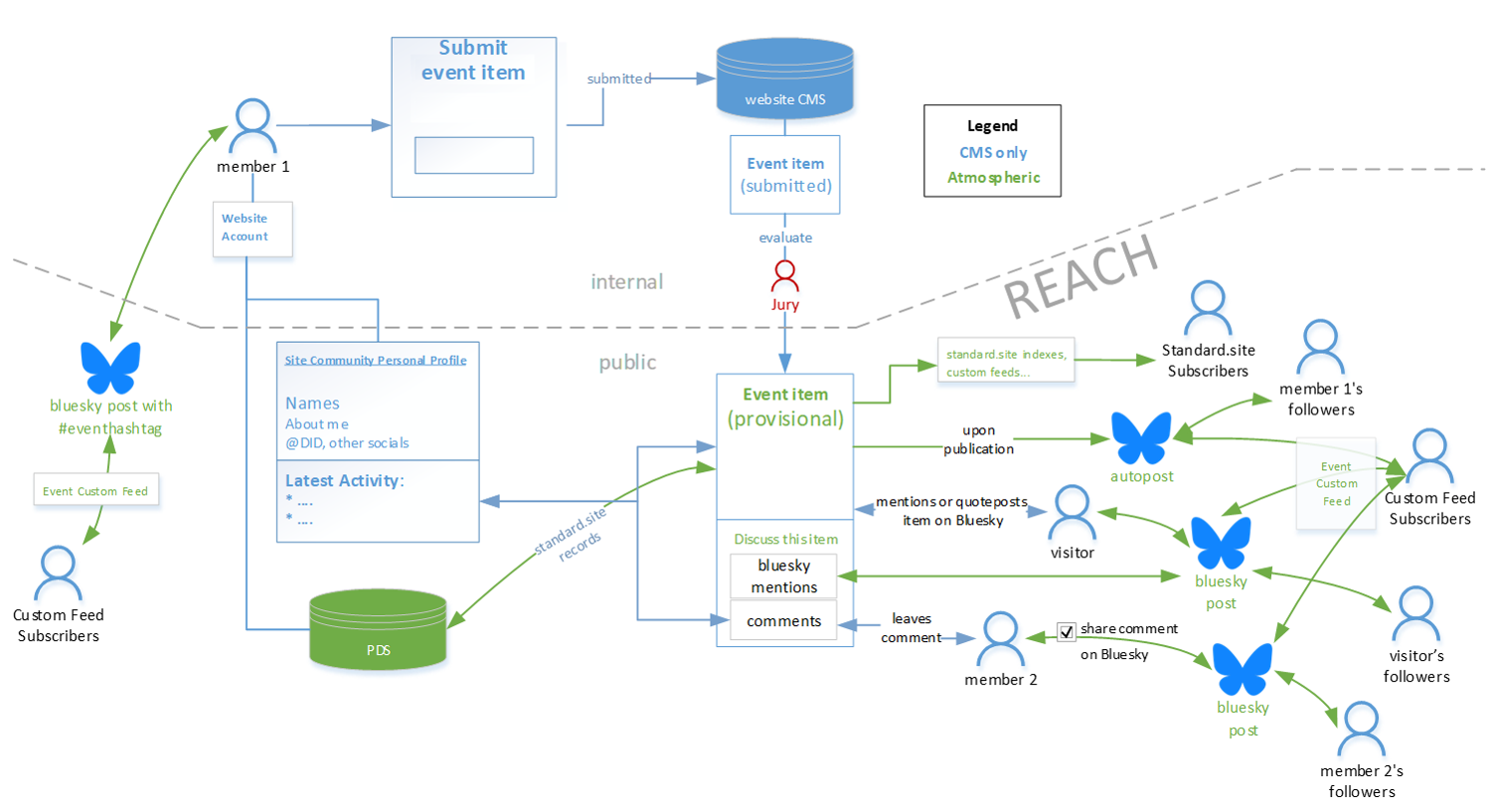
It shows:
- a user joins the community, becoming Member 1. If s/he has a DID (or if opt in for getting one)
- the DID's included in their public profile and the site CMS
- they are auto-added to the event's custom feed (another opt in, as set out in Berlin)
- Member 1 proposes an event item - for now, this is only accessible to Organisers via the CMS. The Organisers' Jury assesses it, likes it, and changes the item's status to Provisional.
- This makes the event item visible to anonymous website visitors
- standard.site records are also auto-published to the user's PDS, so the event item appears in standard.site indexers, and event subscribers' feeds on both standard.site apps and Bluesky
- an automatic Bluesky post is published to Member 1's followers (if s/he opted in); this also appears in the event's Bluesky custom feed
- any Visitor with a DID can mention or quote-post the event item to their Bluesky followers. Their post appears
- in the event's Bluesky custom feed (unless they manually delete the automatically placed hashtag)
- on the event item itself, where others can follow it to Bluesky to join the conversation there
- community Member 2 comments on the event item. If they have a DID, they can opt to auto-share that comment to their Bluesky followers; this post also appears in the the event's custom feed.
Personally I would prefer a single unified stream of comments & mentions, rather than Leaflet's two separate streams, but It's possible that there are good reasons for Leaflet's approach.
First experiment
To figure this out I need to understand standard.site better, so I thought I'd run a little experiment in the run up to ATProto.science (Vancouver, March 2026).
The atproto.science organisers had already asked participants to submit event items (presentations, demos, lightning talks), selected the most interesting ones, and organised them into a conference programme (workshops composed of 3-4 event items).
While the scope for event co-creation is limited (the selection, after all, has already been made) I thought it could be interesting to see whether we could use Leaflet and Bluesky to support conversations about the event programmein the run-up to the event.
So in mid February I started publishing the selected proposals into a Leaflet publication, with one subpage per workshop. My first attempt wasn't great, so Ariel Lighty joined in to improve the presentation.
Pretty soon we will invite the authors to:
- further flesh out their ideas (we provide them the edit link for their subpage)
- provoke a conversation - on Leaflet and/on Bluesky - with participants interested in their event item.
Hopefully some of the speakers will have some interesting conversations in the run-up to their workshop, which will enrich the workshop for all concerned.
And, in a perfect world, the speakers in each workshop would also work together to find the threads connecting their respective event items and elaborate a full workshop description.
Will that happen? As I write this I have no idea - that's why it's an experiment, which is appropriate enough, given that it's atproto.science. I already know that it won't be perfect - for example, as I'm the author of all the subpages, I'll be getting all the notifications of comments, not the speakers. And there aren't (yet) any notifications when a Leaflet is mentioned on Bluesky, or when your Bluesky address is mentioned on Leaflet.
All of which means the speakers will have to visit their Leaflet subpage to stay on top of comments and Bluesky conversations about their event item (although if they subscribe to their page, they'll see the latter via their Leaflet Reader custom feed). A good implementation of standard.site within an event website would steer all these notifications to the appropriate DID.
But even if there is very little interaction, at the very least I will have learnt a little bit about how Leaflet and standard.site works, which is directly relevant to my atproto.science workshop: Coopetition in the ATmosphere.
So if you can't make it to my workshop, let's chat about it online via the above subpage. And if you can, let me know what you'd like to bring to the discussion when we meet face2face.
Revision Notes
This is one of this wiki's pages managed with the permanent versions pattern described in Two wiki authors and a blogger walk into a bar…
- changes in this version: (2026-02-02)
- added remaining diagram
- version control
- this is version: 2
- this is the current version: Co-creating your physical event with your online community
- here is the previous version: Co-creating your physical event with your online community 1