Event co-creation using Leaflet
This page focuses on using Leaflet - one implementation of standard.site - for event co-creation.
It was written in support of Event co-creation on the Atmosphere, and uses as an example a short experiment I'm doing in the run up to the ATProto.science conference, so if you landed on this page directly, you might want to check out the parent post for the wider context.
Getting My Head Around Leaflet
Leaflet.pub is one of the three originators of standard.site. To be honest it took me a little while to get my head around Leaflet, and there's still a chance that I've got something wrong, which is one reason why this is one of my experimental, multiple-version posts.
Basic Leaflet Components
You can do everything from simply publishing a standalone page right through to creating a Leaflet Publication, within which there are Pages, within which you can embed subpages, which appear to the right of the page:
!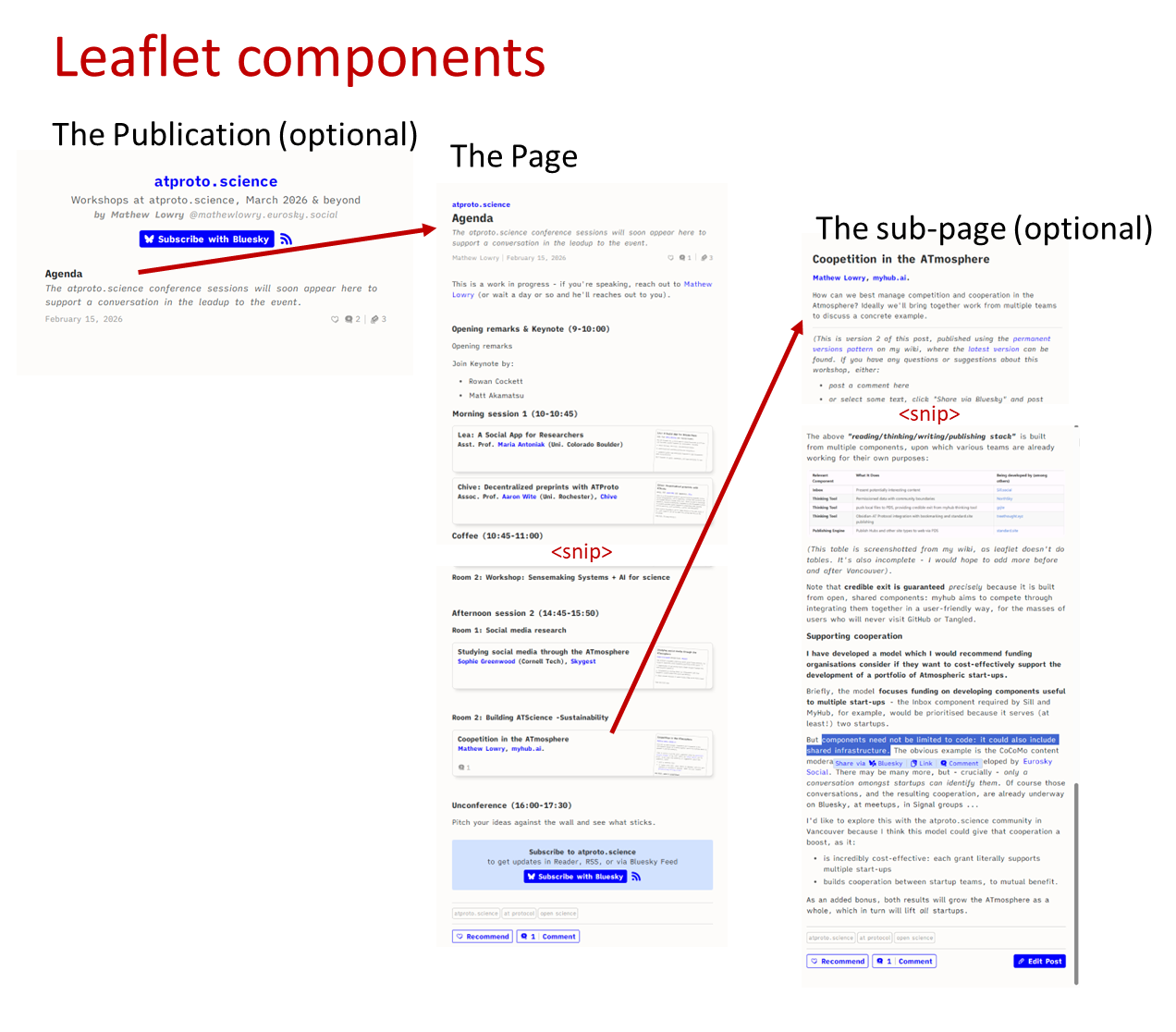
The above diagram shows (top-left to bottom-right):
- a publication ("ATProto.science") listing one Page: the agenda
- The Agenda Page (with a large chunk cut for length reasons) largely composed of embedded Subpages
- One of those subpages, open to the right
Interaction and Sharing Options
Things get really interesting when you want to interact with this content - users can both comment on posts and share image-quotes to their followers on Bluesky:
!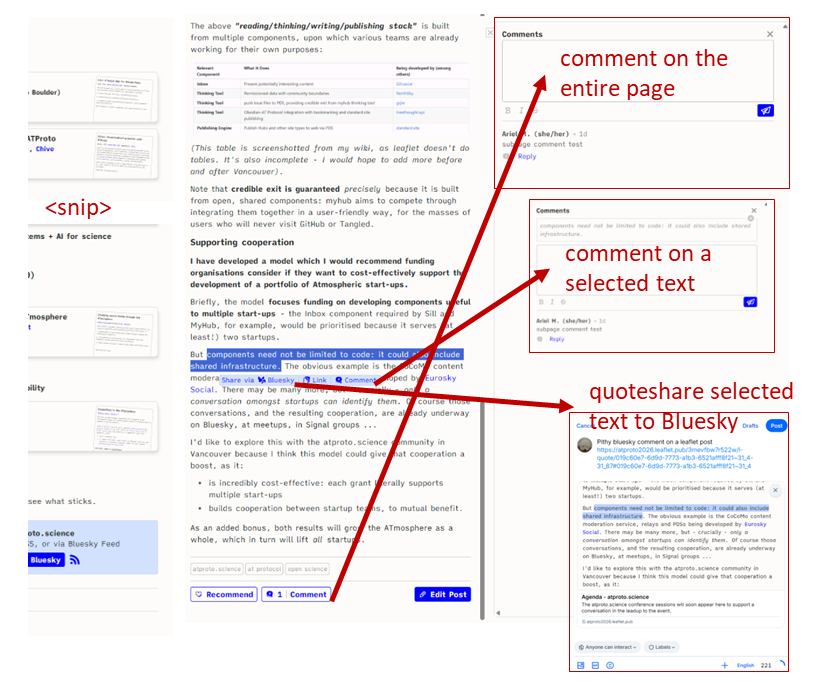
This second diagram shows:
- A traditional comment button at the bottom which opens a standard comment field to the right (top right)
- a small pop-up when the user selects some text, giving additional options:
- comment on the selection (the selected text appears above the user's comment)
- share the link to the exact location selected (try it)
- post to Bluesky your thoughts about the selected text - Leaflet creates an image of the selected text, and its immediate neighbourhood, to include in the Bluesky post.
Once I quote-posted my pithy comment to Bluesky, above, the page got a Mentions feed showing all mentions on Bluesky of any (sub)page:
!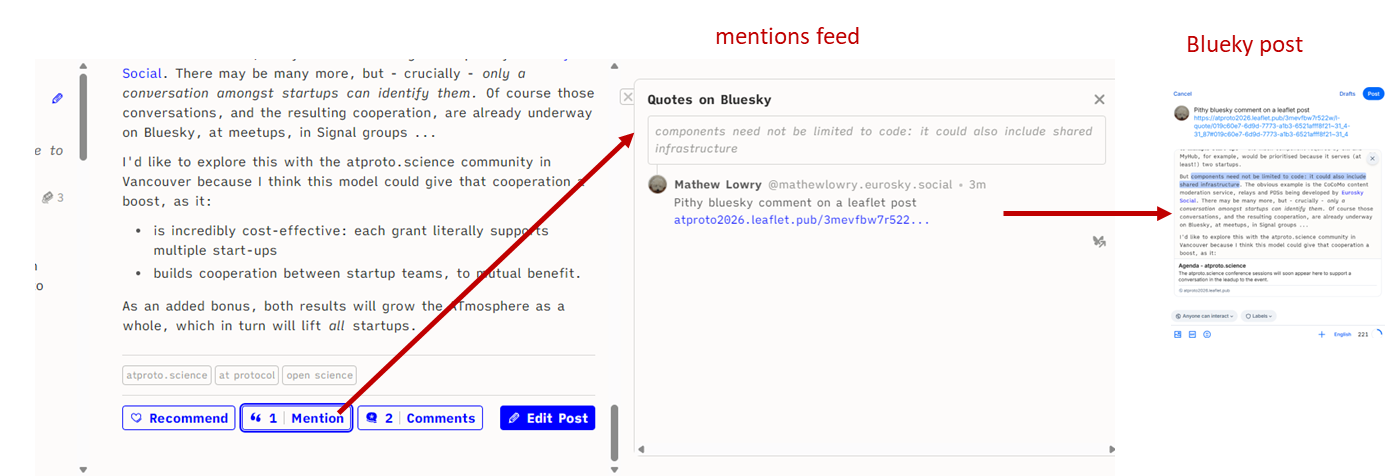
Anyone visiting the page can thus quickly get involved via the comments feature or jump straight to the relevant conversations on Bluesky.
Note: personally I would prefer a single unified stream of comments & mentions, rather than Leaflet's two separate streams, but it's possible that there are good reasons for Leaflet's approach.
Subscribing and Discussing
In many ways this reminds me a little of early integration between the Medium blogging platform and Twitter. However, that was one app choosing to inter-operate with another, and it only lasted a year or two.
With Leaflet and Bluesky, on the other hand, the inter-operability is guaranteed by the protocol. Which is why anyone with a DID can subscribe to any Leaflet publication, and any other app can see that subscription.
This enables all standard.site apps to do all sorts of interesting things, for example:
- the dedicated Leaflet reader not only shows you posts from Leaflet publications you subscribe to but also from anything you subscribe to on pckt.blog, another standard.site app
- the Leaflet Reader Bluesky custom feed means you can keep up with your standard.site subscriptions via any Bluesky app (Bluesky, Blacksky, Anisota, Deck.Blue...)
- there's even a Leaflet Quotes Bluesky custom feed which shows quote-posts from all Leaflet Publications (unlike the "Reader" custom feed, this one's not customised to you... I think).
- and your leaflet posts can appear in your personal blog, if you build the latter on the Atmosphere - i.e., you can blog on Leaflet to get additional reach, and still show your posts on your own blog. Because it all resides on your PDS - the content's yours.
So what does this mean for event co-creation?
Imagine you publish every provisional or final event item using standard.site within your event website. I see the following benefits:
More interactive features
As far as I can see, your audience we'll be able to:
- comment on the event item after logging in with their DID
- share selections from the page to their Bluesky audiences without having to log in at all
- discover all the comments and Bluesky conversations from the event item
- subscribe to only those event items that interest them, spo you're not flooding your users' inboxes with every notification from across the entire event programme
- follow those conversations, and be alerted to new posts, using their Bluesky app, or their Leaflet reader, or even a dedicated app you embed on your site and/or provide for their phones.
A simpler CMS
And you don't have to build any of this yourself.
Despite offering additional features I've never seen on an event co-creation website, the actual CMS becomes pretty simple, because you're farming out most of the interactive features to the Atmosphere.
Better reach
Moreover, you're also getting a huge reach bonus.
The following diagram shows how an event item in your website's provisional programme is created and published using standard.site, and connected to users across the Atmosphere:
!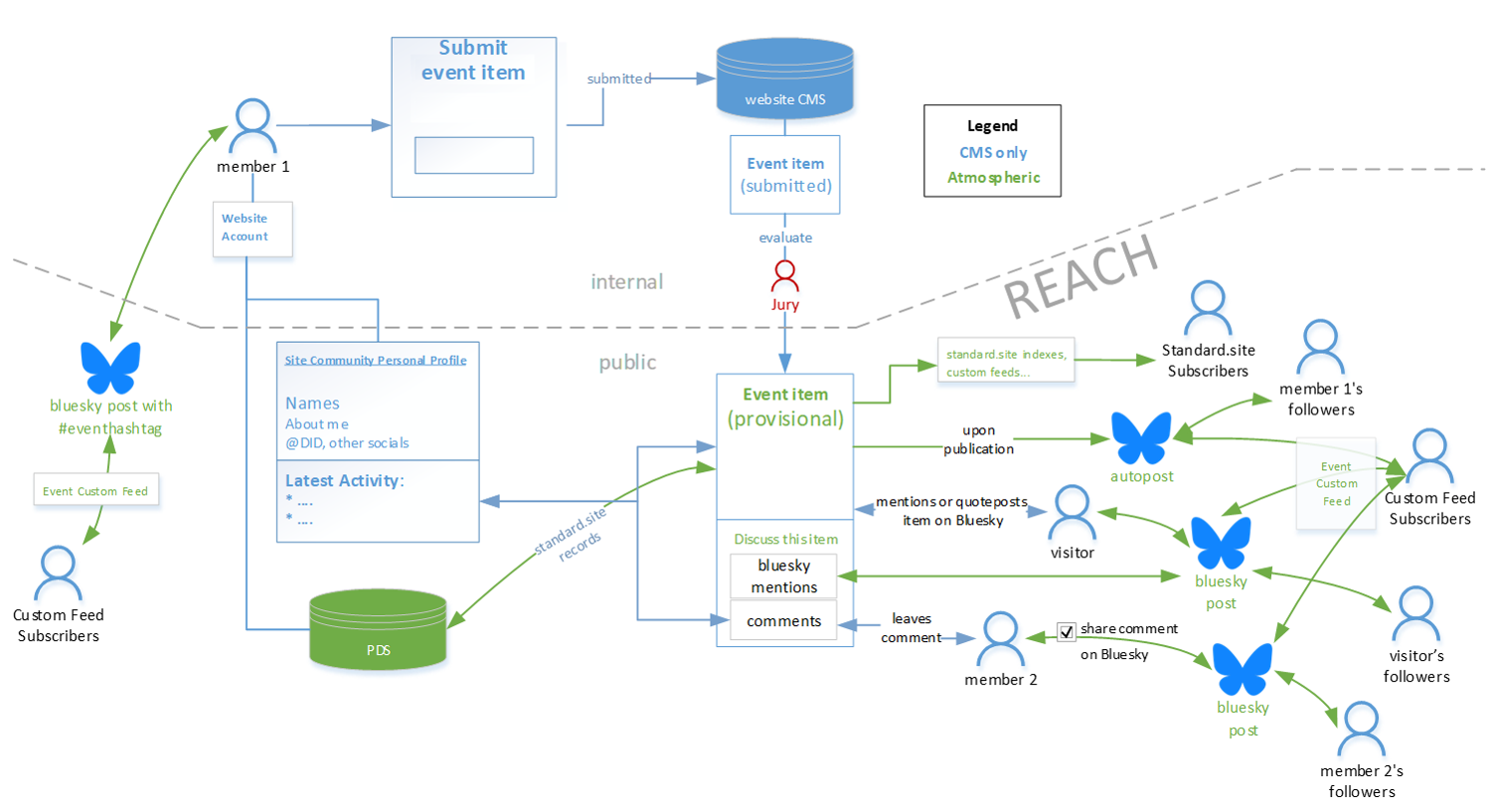
It shows a lot, so let's start with the account creation and event item submission workflow:
- a user joins the community, becoming Member 1 (top left). If s/he has a DID (or opts in for getting one)
- the DID's included in their public profile and the site CMS
- s/he is auto-added to the event's custom feed (another opt in, as set out in Berlin), and so can reach the custom feed's audience by including the right hashtag (left)
- Member 1 proposes an event item (top centre): for now, this proposal is only accessible to Organisers via the CMS.
- The Organisers' Jury assesses it, likes it, and changes the item's status to Provisional, making the event item visible to anonymous website visitors (centre).
And that gives the event item REACH (bottom-right):
- the event item appears in standard.site indexers, and event subscribers' feeds on across both standard.site and Bluesky apps
- an automatic Bluesky post is published to Member 1's followers (if s/he opted in); this also appears in the event's Bluesky custom feed, reaching that audience
- any Visitor with a DID can mention or quote-post the event item to their Bluesky followers. Their post appears:
- on the event item itself, where others can follow it to Bluesky to join the conversation there
- in the event's Bluesky custom feed (unless they manually delete the automatically placed hashtag).
- community Member 2 comments on the event item. If they have a DID, they can opt to auto-share that comment to their Bluesky followers; this post also appears in the the event's custom feed.
Up to: Event co-creation on the Atmosphere
Revision Notes
This is one of this wiki's pages managed with the permanent versions pattern described in Two wiki authors and a blogger walk into a bar…
- changes in this version: (2026-02-21)
- created as I split v2 of the main post into 4 interlined files
- version control
- this is version: 1
- this is the current version: Event co-creation using Leaflet
- here is the previous version: n/a